November 8, 2026 · 12 min
AI Agent Harness — My Personal Setup
AI ArchitectureLocal LLMAgentic AIEngineering

I have always been interested in technology. As a teenager, I was in the computer science club at school. In our small village, we were the very first to be on the internet. I have spent my entire career in tech: database developer, software engineer, project manager, agile coach, leader.
Now AI has completely turned my previous work upside down.
But AI is also a powerful tool for me. I am now using it to build something new.
Here I explain my setup. What is often described with the term “harness” is actually many different things.
I had my AI create this table and the diagram.
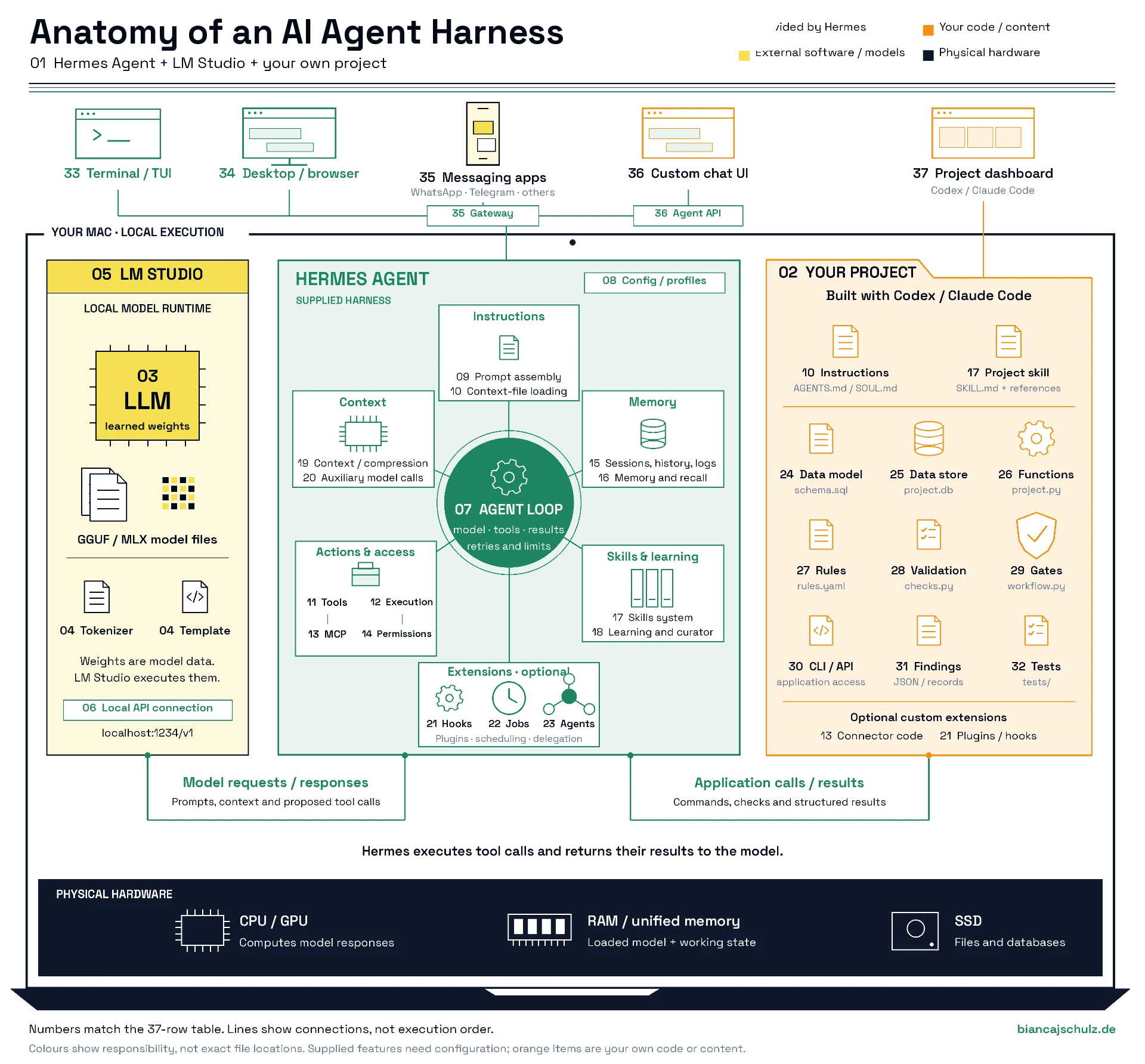
| Component | What it physically and technically is in my setup | What it does | How you obtain or provide it |
|---|---|---|---|
| 1. The complete setup | Your Mac + your chosen interface + Hermes Agent by Nous Research + LM Studio + local model files + your project application. The Mac supplies the CPU/GPU, RAM or unified memory, and SSD. | Hermes connects the components: it requests model responses from LM Studio and invokes your application through tools. The diagram groups components by responsibility, not by their exact location on disk. | Install Hermes and LM Studio, download a model and add your project application. Hermes supplies the general agent harness; you add the application-specific parts. Paths below assume the default Hermes profile on macOS. Custom application filenames are suggestions. |
| 2. A project folder for your own application | A folder such as my-project/, containing application code, configuration, data definitions, skill source files and tests. Installed skills and my own Hermes configuration live elsewhere. | Keeps your application’s components together. This folder supports your custom application; Hermes itself can run without a custom application. | Describe your requirements and have Hermes / Codex / Claude Code create, edit and test the files. Install the resulting application and its dependencies on your Mac so your local Hermes can use it. |
| 3. The LLM and its weights | Downloaded model files, for example a .gguf file or an MLX-compatible package containing .safetensors files.Weights are numerical parameters learned during training. They are loaded into computer memory for inference. | The model interprets the supplied context, generates text and proposes tool calls. Ordinary conversations, memory updates and skill creation do not change its weights. They change the information supplied to the model. | Download a model through LM Studio. Choose a version that fits your Mac’s available memory and supports tool calling reliably. Hermes Agent does not require a model from the Hermes model family. |
| 4. The tokenizer and model chat template | Model-associated data and formatting rules used by LM Studio. The tokenizer converts text into tokens; the chat template formats messages, roles and tool information as the model expects. LM Studio normally obtains the template from model metadata. | Makes the structured conversation understandable to the model. Incorrect formatting can cause poor responses or tool calls that appear as ordinary text. | Normally included with the downloaded model and handled by LM Studio. Test a complete tool call and returned tool result; adjust the template only if necessary. |
| 5. Software that executes the model: LM Studio | The installed LM Studio application, its inference runtime and a running local API server. Supported runtimes include llama.cpp and, on compatible Macs, MLX. | Loads the weights and performs the calculations that generate model responses. Uses RAM/GPU memory for weights and temporary inference state. In this setup, Hermes manages the agent workflow; LM Studio serves the model. | Install LM Studio, download and load the model, then start its local server. Set a context length that both the model and your hardware can support. |
| 6. The connection between Hermes and LM Studio | Hermes provider settings containing the model identifier and LM Studio’s API address, normally http://localhost:1234/v1. Credentials are needed if you enable server authentication. | The diagram’s “Model requests / responses” connection. Hermes sends instructions, context, tool descriptions and previous tool results. The model returns generated text or proposed tool calls. “OpenAI-compatible” describes the API format; the connection can remain local. | Run hermes model, select LM Studio, confirm the server address and select a discovered model. Test a conversation and a complete tool operation, including the returned result. |
| 7. Hermes Agent’s execution loop | Built into Hermes: the central orchestration code for an agent run. Its agent implementation is AIAgent; the conversation loop and turn-handling code live in Hermes’s agent/ package. | Coordinates model requests, tool execution and returned results. Handles retries, errors and execution limits. The LLM proposes tool calls; Hermes executes them through its tools and supplies the results to the model. Its central position in the diagram represents this coordinating role within Hermes. | Install Hermes Agent. You do not need to program this general orchestration loop yourself. Configure its limits and enabled capabilities for your project. |
| 8. Hermes configuration, credentials and profiles | Built into Hermes: configuration support, files such as ~/.hermes/config.yaml, credential storage such as ~/.hermes/.env, and optional separate profiles. | Stores model selection, tool settings, execution options and other configuration. Profiles allow different configurations and agent state for different purposes. | Use Hermes setup, configuration commands or its settings interface. Create separate profiles if needed. Hermes supplies the configuration mechanism; you supply the settings and credentials. |
| 9. System-prompt assembly | Built into Hermes: code such as agent/prompt_builder.py, which assembles instructions, project context, skill information, memory and runtime information. | Constructs the information the model receives about its role, capabilities, user and current environment. The model does not automatically see every file on your Mac. Hermes must include information or retrieve it with tools. | Supplied by Hermes. You configure or write the relevant input files; Hermes assembles them into the model’s context. |
| 10. General behaviour and project instructions | Hermes supplies the loading mechanism. Examples are ~/.hermes/SOUL.md for identity and communication style, and my-project/AGENTS.md for project conventions and instructions. | Provides standing guidance: where data lives, which commands to use and when to involve you. Written instructions guide behaviour but do not create executable validation or enforce database transitions. | Write these files yourself or have Hermes / Codex / Claude Code draft them. Start Hermes in the intended project directory and verify that the relevant instructions are loaded. |
| 11. Tool definitions, registry and dispatch | Built into Hermes: a registry of tools, machine-readable descriptions of their arguments and code that dispatches requested calls to the correct implementation. | Tells the model which actions are available and how to request them. Hermes routes a requested action to the corresponding tool. A tool description and the code that executes it are different things. | Enable the required toolsets. Add a custom tool only when an existing terminal command, connector or other tool does not provide a suitable interface. |
| 12. Tool execution and the operating environment | Built into Hermes: file tools, terminal tools and an execution backend. Commands can run locally on the Mac; alternatives include container and remote environments. | Reads and changes files, launches programs and executes your application’s commands. The backend determines where those actions happen and which files and dependencies are available. | Select the local backend for a straightforward Mac setup. Install Python and any libraries your application needs. Configure a different backend if you want execution elsewhere or additional isolation. |
| 13. Connections to external applications and services | Hermes integration capability plus separately configured connections: built-in tools, plugins or MCP servers. An MCP server is another program or service that exposes tools to Hermes. | Gives the agent access to systems such as email, calendars, document stores or databases. Running the LLM locally does not itself provide access to those systems. | Configure the integrations your project needs and supply their credentials. Use existing connectors where suitable. Have Hermes / Codex / Claude Code build a custom integration if required. |
| 14. Permissions, approvals and isolation | Built into Hermes, with configuration required: command-approval handling, messaging-user authorization, file-access controls and supported execution isolation. | Controls who can instruct the agent and which actions require approval or are restricted. These controls address execution access; they do not automatically enforce your project’s business rules. | Configure approval behaviour, allowed messaging users and execution permissions. Implement project-specific conditions—such as “send only an approved version”—inside your application’s operations. |
| 15. Conversation history, sessions and diagnostic logs | Built into Hermes: a SQLite session database, normally ~/.hermes/state.db, and diagnostic files under ~/.hermes/logs/. | Preserves conversation history and session metadata, supports resuming sessions and helps investigate failures. Saved history is not the same as the content currently inside the model’s context window. | Hermes creates and maintains these stores. Use its session and history features. Keep your application’s authoritative records in its own data store. |
| 16. Persistent factual memory and user preferences | Built into Hermes: bounded text stores such as ~/.hermes/memories/MEMORY.md and USER.md, maintained through the memory tool. Previous conversations can also be retrieved with session search. | Carries selected facts, preferences and lessons into later sessions. A correction persists only if it is actually saved somewhere appropriate; saying “I will remember” is not a saved update. | Tell Hermes what should be remembered and verify the resulting entry. Store large datasets and authoritative project records in your application’s storage. Optional memory-provider integrations can extend the built-in system. |
| 17. The skills system and your project skill | Hermes supplies the skill system; I create the skills myself. Skills contain SKILL.md and optional scripts or reference files. One installation location is ~/.hermes/skills/my-project/SKILL.md. | Gives Hermes reusable procedures: which commands exist, their intended order, how to interpret results and when to stop. Hermes can load full skill instructions when needed. Your skill can belong to your project while physically residing in Hermes’s skills directory. | Describe the workflow and have Hermes / Codex / Claude Code create the skill and supporting files. Install it where Hermes loads it. A skill instructing Hermes to run a check does not itself enforce that check. |
| 18. Learning from experience and maintaining skills | Hermes capability: tools for creating and updating skills and memory, plus a curator that maintains agent-created skills. Persistent changes are files and metadata. | Allows procedures and corrections to influence future runs. The curator can review, consolidate or archive agent-created skills. This is learning through stored context and procedures, not automatic retraining of model weights. | Configure the relevant features. Save a procedural correction in a skill, a stable preference in memory and an enforceable requirement in application code and tests. Verify that the intended change was made. |
| 19. Active context and context compression | Built into Hermes: the current message context, token-budget handling and a context engine. The default engine summarises parts of long conversations. LM Studio separately maintains temporary inference state. | Helps a long-running task fit within the model’s usable context window. Compression does not enlarge the model’s context limit, and summaries can omit details. Stored files and history allow information to be retrieved again. | Match Hermes’s context settings to the context actually available in LM Studio. Configure compression and keep important facts in durable, retrievable storage. Alternative context engines are optional extensions. |
| 20. Auxiliary model calls | Built into Hermes: additional model requests for supporting tasks such as summarisation, session titles or image analysis. They can use the main model or separately configured models. | Performs supporting work around the main conversation. You do not necessarily need another set of weights: the same local LLM can handle compatible auxiliary tasks. | Check auxiliary-model and fallback settings. Point required tasks to local endpoints if you want local inference throughout. Image analysis requires a suitable vision-capable model. |
| 21. Plugins and event hooks — optional | Hermes supplies the extension mechanisms. Plugins and executable hooks add behaviour at defined events, such as before or after a tool call. Your extension is additional code and configuration. | Adds tools, integrations, logging or automatic reactions. Some hooks can block tool calls or modify information passed into a model request. | Install an appropriate plugin or have Hermes / Codex / Claude Code implement an extension. Use hooks for agent-level integration; keep authoritative project checks in the application operations that change project state. |
| 22. Scheduling and unattended execution — optional | Built into Hermes: scheduled job definitions, a scheduler and the running service that executes jobs. | Starts work at a specified time or repeatedly without you opening a conversation. Scheduled tasks can use skills, tools and a configured model. | Create jobs through Hermes’s scheduling features. For execution on your Mac, the machine must be awake and the required Hermes service and local model server must be available. |
| 23. Delegation to subagents — optional | Built into Hermes: child agent instances with their own conversation contexts, created through delegation tools. They can use the same local model server. | Splits work into separate tasks and returns results to the parent agent. Several agents do not inherently require several different LLMs. Their requests still consume your machine’s inference capacity. | Enable delegation if useful. Configure model routing and concurrency to suit your local server. You can start with one agent and add delegation later. |
| 24. Your project’s data model | Custom application component: a definition such as schema.sql, describing tables, fields and relationships. For example, jobs with ID, content, version and status, and findings with validation issues. | Defines which information your application stores in structured form and how records relate to one another. Hermes’s conversation schema does not define this for your project. | Explain the entities and information your project needs. Hermes / Codex / Claude Code translates them into tables, fields, relationships and code that creates or updates the structure. |
| 25. Your project’s persistent data store | Custom application component: for a local setup, a SQLite database such as my-project/project.db. Larger documents can remain ordinary files referenced by database records. | Preserves jobs, results, versions, findings and workflow status after Hermes exits. This is separate from Hermes’s memory files and session database. | Have Hermes / Codex / Claude Code write the code that creates, reads and updates the database. SQLite does not require a separate database server. |
| 26. Your actual project functions | Custom application component: executable code, for example project.py, with functions such as “create job”, “load input”, “save result” or “prepare email draft”. | Performs your project’s concrete operations. Hermes invokes these functions through an exposed command or tool; the LLM does not execute them directly. | Describe the required actions. Hermes / Codex / Claude Code implements them using suitable libraries and external APIs where needed. Install the required dependencies in the execution environment. |
| 27. A registry of project rules | Custom application component: a configuration file such as rules.yaml and a code mapping. Rules can have an ID, description, parameters, enabled status and associated validation function. | Records which checks apply. For example, the rule required_fields invokes check_required_fields. Makes requirements explicit and maintainable. | Define the business requirements. Hermes / Codex / Claude Code creates the file and its mapping to validation code. A small project does not require a separate rule-management platform. |
| 28. Executable validation functions | Custom application component: code such as checks.py that examines data—for example, missing fields, invalid values or nonexistent referenced files. | Performs the actual checks and produces a pass result or findings. This is where a written requirement becomes an executable check of project data. | Define what counts as valid or invalid. Hermes / Codex / Claude Code implements the checks. Questions such as “Is this argument convincing?” require additional human or model-assisted assessment. |
| 29. Gate and state-transition logic | Custom application component: code such as workflow.py, together with version and status fields in the database. | Determines whether a job may enter its next state. For example, “approved” can be stored only when required checks have passed for the current version. Changes must invalidate outdated approvals. | Define states and transition conditions. Hermes / Codex / Claude Code implements them inside the operations that change state. For a gate to be technically binding, the agent must not have an unrestricted alternative route that bypasses it. |
| 30. A callable interface to your application | Custom application component: for example, a command-line interface in cli.py, exposing commands such as project check 123. Alternatives include a custom Hermes tool, an API or an MCP server. | Provides the diagram’s “Application calls / results” connection. Hermes invokes an operation and receives its result. This interface is separate from both the Hermes terminal chat and Hermes’s own agent API server. | Have Hermes / Codex / Claude Code implement commands or endpoints that call the application functions and enforce their transition checks. Hermes can invoke a CLI through its terminal tool. |
| 31. Validation results and corrective feedback | Custom application component: structured responses, such as JSON, plus records in project.db: rule ID, affected record, version, error description and possible correction. | Gives Hermes actionable feedback so it can correct an input, rerun checks or involve you. Hermes can pass the result to the model for further reasoning. Preserves evidence of what was checked and why it failed. | Hermes / Codex / Claude Code implements the output format and storage. Your project skill explains how Hermes should interpret findings, retry and stop when correction is unsuccessful. |
| 32. Tests for your own application | Custom application component: a tests/ folder containing test code and example data, including valid cases, invalid cases and expected outcomes. | Verifies that checks detect errors and workflow gates reject invalid transitions. Includes cases where a previously approved record changes and requires fresh validation. | Supply representative examples and boundary cases. Hermes / Codex / Claude Code implements automated tests. You confirm that the expected outcomes match your business requirements. |
| 33. User interface option: terminal chat | Provided by Hermes: its command-line interface, opened with hermes, or its terminal user interface, opened with hermes --tui. | Lets you converse with the agent, see responses and inspect tool activity in a terminal window. A terminal interface does not mean your instructions must be programming commands. | Use the interface included with Hermes. No custom UI is required. |
| 34. User interface options: Hermes Desktop and browser interfaces | Provided by Hermes: Hermes Desktop, the browser-based workspace and a separate administrative web dashboard. These connect to the Hermes agent backend. | Provides graphical access to conversations, files, settings, skills and management functions. The interface is the visible access point; model inference and agent execution happen in the underlying components. | Install Hermes Desktop or use a supported browser interface. Choose whichever suits your work; you do not need to build your own graphical interface. |
| 35. User interface options: WhatsApp, Telegram and other messaging applications | Hermes supplies the gateway and supported platform adapters; messaging applications and accounts are separate. Channels include Telegram, WhatsApp, Discord, Slack, Signal and others. | Receives your messages, routes them to Hermes and sends responses back. The agent and model can run on your Mac while you communicate from your phone. Messages still pass through the selected messaging service. | Configure the chosen channel, including its required credentials or account connection and allowed users. Keep the gateway and local inference service running. Setup requirements differ by platform. |
| 36. User interface option: a custom agent chat interface | A custom UI plus Hermes’s built-in API server: a web or desktop application that sends requests to Hermes and displays responses and execution progress. Hermes exposes an OpenAI-compatible agent endpoint. | Lets you design your own way of talking to the agent. Connect this UI to Hermes to use its tools, skills and memory. Connecting directly to LM Studio invokes the model without this Hermes workflow. | Have Hermes / Codex / Claude Code build the interface and connect it to Hermes’s API server. Configure authentication and session handling. An existing compatible frontend is another option. |
| 37. User interface option: your project’s operational dashboard | Custom application component, optional: a local web application displaying project records, results, statuses, versions and findings. It can also include a Hermes chat panel. | Lets you inspect and edit project data through forms, tables and buttons. Its data operations call your application functions. A project dashboard and an agent chat interface serve different purposes; one application can contain both. | Have Hermes / Codex / Claude Code build the dashboard on top of the same project functions and state-transition checks. Add it once those functions work; Hermes does not require it to operate your application. |